
Hotel checklists and training quizzes
Open a checklist to customize and save it. Use its companion quiz to discuss the decisions behind the procedure.
Review performance and demand
Review the daily revenue report, pickup and exceptions, then record pricing decisions and follow-up owners.
Practice interpreting performance measures and choosing the next action.
Hotel Daily Revenue Review Quiz: Metrics and ActionsUpdate demand assumptions using bookings, cancellations, group pickup and local events. Record what changed and why.
Check how pickup, cancellations and events affect a forecast.
Hotel Demand Forecasting Quiz: Pickup and Assumptions
Control rates and distribution
Check approved rates, room mappings, dates and restrictions before verifying the update across booking channels.
Test rate-loading checks, availability and stay restrictions.
Hotel Rate Loading Quiz: Availability and RestrictionsCompare like-for-like offers across channels, capture discrepancies and assign corrections.
Practice matching room types, conditions, taxes and inclusions.
Hotel Rate Parity Quiz: Compare Rates and Conditions
Keep the four revenue workflows distinct
A pricing decision is not complete when it is agreed in a meeting. The team still needs to load it, verify it and review its effect.
Start with a consistent daily view
Use the same business date, reporting cut-off and comparison periods. Separate occupancy and rate changes from data errors before deciding what needs attention.
- Review actual results and pickup.
- Identify dates, segments or room types that need attention.
- Record the decision, owner and review date.
Verify the offer after a change
A channel confirmation is not the same as a guest-facing booking check. Compare the intended room, date, occupancy, cancellation terms and inclusions before closing the action.
- Approve the change before loading.
- Check the affected dates and restrictions.
- Record any mismatch and the next verification.
Keep the forecast explainable
Record the assumptions behind a forecast change so the next reviewer can distinguish new demand from a revised expectation. Keep accounting reconciliation in the finance workflow.
- Review group pickup and cancellation assumptions.
- Account for relevant events and changes in trading conditions.
- Save the reason for material revisions.
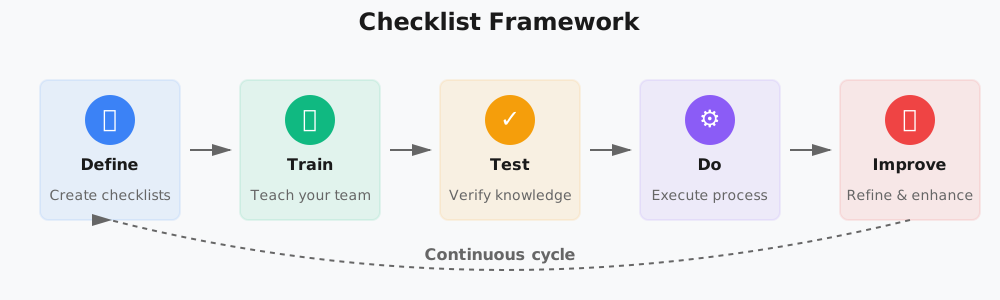
How it works
Define, Train, Test, Do, Improve
The Checklist Framework keeps every shift aligned:
Define
Set the reporting cut-off, approval limits and channel checks for your property. Keep each revenue procedure focused on one decision or handoff.
Train
Walk through a recent trading date with the team. Show how the report, forecast and guest-facing offer connect without treating them as the same job.
Test
Use the companion quizzes to discuss rate comparisons, forecast assumptions and approval decisions before staff handle live updates.
Do
Save the relevant checklist for the review or update. Record the action and owner, then verify the result before marking the work complete.
Improve
Review repeated mismatches, unclear assumptions and overdue actions. Update the procedure when the team changes its reporting or distribution process.
Benefits
Why use Checklist for hotel revenue management?
Fewer missed checksKeep date ranges, restrictions and channel verification in the same rate-update routine.
Clearer decisionsCapture the reason for an action so the next shift does not have to reconstruct it.
Better handoffsMake unresolved discrepancies and follow-up ownership visible.
Repeatable reviewsReuse a Template for the next trading date while keeping each review separate.
Revenue Management Frequently Asked Questions
What should a hotel daily revenue review cover?
How is a demand forecast different from a daily revenue review?
What does a hotel rate parity check compare?
Can I download these checklists?
Do these checklists replace our revenue management system?
Make your next revenue review actionable
Choose the procedure you need, adapt it to your systems and give every follow-up a clear owner.