
The Time Blocking Method
Learn how to plan your day with time blocking, protect deep-work sessions, and schedule recovery breaks without overscheduling.
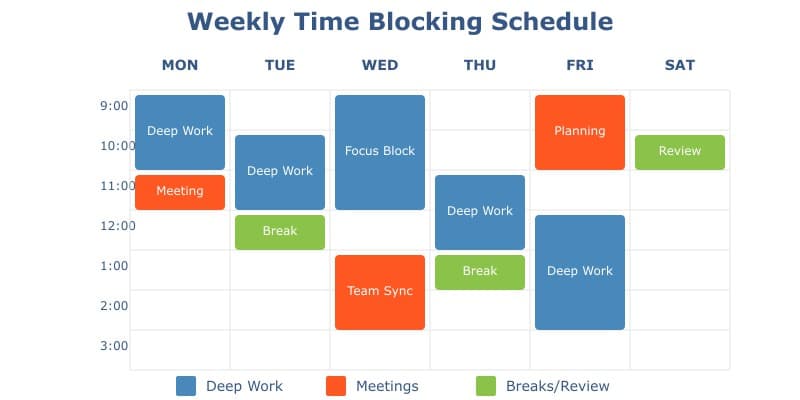
Time to Implement
Learn how to plan your day with time blocking, protect deep-work sessions, and schedule recovery breaks without overscheduling.
Difficulty Level
Beginner
Required Items
3
Key Benefits
Enhanced Focus
Reduce context switching and increase deep work capabilities by dedicating specific time blocks to single tasks.
Reduced Stress
Eliminate decision fatigue and scheduling anxiety by having a clear, structured plan for each day.
Better Time Awareness
Gain realistic insights into how you spend your time and improve estimation skills for future planning.
Increased Productivity
Boost daily output by up to 80% through structured work periods and deliberate task allocation.
What is Time Blocking?
Time blocking is a productivity method where you divide your day into distinct time periods (blocks) dedicated to specific tasks or groups of tasks. Instead of working from a traditional to-do list, you schedule exactly when you'll work on each task, making room for important work while leaving gaps for breaks and unexpected tasks. While a Time management checklist helps you establish good habits, time blocking takes it further by creating a structured framework for your entire day.
The Challenge
Messages, meetings, and urgent requests can push important work aside. A to-do list tells you what needs doing, but not whether it fits into the day. Putting tasks on your calendar helps you spot conflicts and decide what can wait.
Perfect for:
Knowledge Workers
Professionals who deal with complex tasks requiring deep focus will find time blocking essential for carving out distraction-free periods for concentrated work. This includes programmers, writers, researchers, and creative professionals. Combined with a Delegation checklist, time blocking helps ensure you're focusing on high-impact work while effectively managing team responsibilities.
Busy Executives
Leaders juggling multiple responsibilities can use time blocking to ensure they allocate appropriate time for strategic thinking, team management, and essential meetings while protecting time for deep work. Using a Meeting preparation checklist alongside time blocking ensures that meeting blocks are used efficiently.
Freelancers
Independent professionals can maintain better work-life boundaries and ensure profitable time management by clearly defining when they'll work on client projects versus administrative tasks.
Students
Learners can better balance study time, assignments, and extracurricular activities while maintaining time for rest and social activities.
How It Helps
-
A clear starting point: Decide when you will work on a task and what you want to finish during that session.
-
A realistic limit: Give each task a time slot so you can see what fits into the day and what needs to wait.
-
Fewer decisions during the day: Choose your priorities in advance, then adjust the plan when something changes.
-
Less switching between tasks: Group similar work, such as routine messages, into one block.
Steps to take:
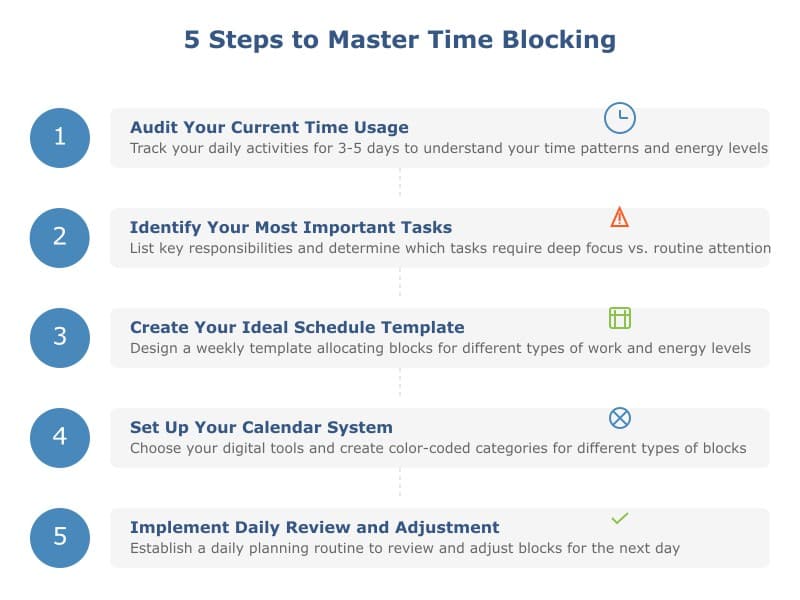
Track how you actually spend time for 3-5 days using a time-tracking app or simple log. Note patterns, interruptions, and energy levels throughout the day.
List your key responsibilities and priorities. Determine which tasks require deep focus and which can be batched with similar activities.
Design a basic weekly template allocating time blocks for different types of work. Include regular commitments and protect your peak productivity hours.
Choose your preferred digital calendar or planning tool. Create color-coded categories for different types of blocks and set up recurring blocks for regular tasks.
Establish a daily planning routine to review and adjust blocks for the next day. Include time for reflection on what worked and what needs modification.
Required Items:
Digital Calendar - A robust calendar app with block scheduling capabilities
Planning Journal - A dedicated notebook for time block planning and tracking
Time Tracking App - Software to monitor block effectiveness and adjustments
Your Next Step:
Frequently Asked Questions
How long should each time block be?
What if my time blocks get interrupted?
How far in advance should I plan my time blocks?
Adding Focus and Recovery Blocks
Time blocking reserves space on your calendar for a task. For demanding work, you can make a time block a focus block: one clearly defined task, fewer interruptions, and an intentional recovery break. Choose a session length that suits the task and your available time, then leave room for a break.
Example morning schedule
- 09:00 to 09:10, Prepare: Choose one outcome, gather the required materials, silence avoidable notifications.
- 09:10 to 10:10, Focus: Work on that outcome. Capture unrelated ideas for later rather than switching tasks.
- 10:10 to 10:25, Recover: Stand, walk, stretch or get away from the screen.
- 10:25 to 11:15, Focus or collaborate: Start another session if your energy allows; otherwise schedule lighter work.
Use this schedule as a starting point. Try shorter sessions for difficult days, and adapt around your meetings and energy levels. For a longer project, create a Checklist task for each focus block and review the completed tasks at day's end.
What to track: the intended outcome, actual focused minutes, interruptions, and how rested you feel after each break. Adjust block lengths based on what actually helps you complete your work.
Tips for Success
Begin with one protected session each day and add more only if useful. Put your most demanding tasks in the hours when you tend to work well. Allow buffer time for transitions and unexpected work.
Common Pitfalls
Keep blocks short enough to stay focused, and leave room for breaks. If work regularly spills over, allow more time or choose a smaller task for the next block.
Remote Work
Share focus periods with colleagues when appropriate, group routine messages into separate blocks, and schedule breaks away from your screen.
Measuring Progress
Review whether you completed your intended outcomes and whether the schedule feels sustainable. Tracking more minutes is not itself the goal.
Complementary Techniques
Use short focus intervals within a time block when helpful. Other useful methods include task batching, a time management checklist, and a weekly review.
Additional Resources:
Recommended Books:
Deep Work: Rules for Focused Success in a Distracted World
Cal Newport's comprehensive guide includes detailed sections on time blocking implementation and case studies.
Four Thousand Weeks: Time Management for Mortals
Oliver Burkeman explores the philosophy behind time management, challenging traditional approaches like time blocking to focus on meaningful productivity.
Getting Things Done: The Art of Stress-Free Productivity
David Allen’s classic work introduces a system for managing tasks efficiently, featuring techniques compatible with time blocking for enhanced productivity.
Recommended Videos:
Cal Newport: Time Block Planner Method
Detailed walkthrough of time blocking implementation with focus on knowledge work optimization
How to Time Block
This video offers an in-depth look into time blocking, demonstrating how to organize tasks effectively to boost productivity and minimize distractions.
The ULTIMATE Time Blocking Guide: Google Calendar, Outlook, and More
A practical guide for setting up time blocks using Google Calendar and Outlook, perfect for digital planners.
Further reading:
Deep Work: Time Blocking Guide
Cal Newport's comprehensive guide to implementing time blocking, with real-world case studies and troubleshooting tips
Time Blocking vs Other Methods
Scientific comparison of different time management techniques, with focus on cognitive benefits of time blocking