
Online Support Request Form Template
Turn form responses into actionable tasks
Scan to open on mobile:
Your full name
The best email to reach you
Where are you seeing the problem?
How much is this blocking your work?
Describe what happened and what you expected
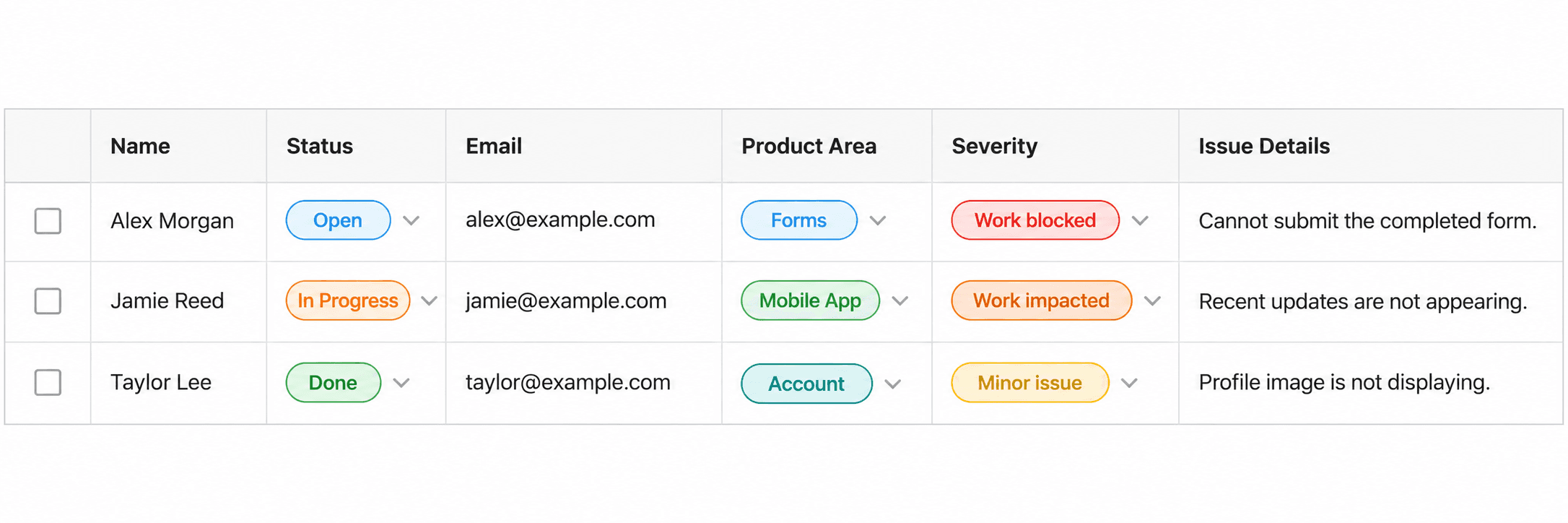
Every Response becomes a Task in your checklist:
Make Support Intake Easier to Triage
This support request form keeps the public experience short while still collecting the details your team needs: who is affected, what area is impacted, how severe the problem is, and what happened.
It works for customer support, internal help desks, and SaaS issue intake. Each submission gives your team enough context to start triage without a long back-and-forth first.
How does it work?
Start with this form template to create a real checklist in your Checklist account.
Customize the checklist by adding, editing, hiding, or reordering fields.
Share the form by link or embed it on your website.
Every response becomes a new task in your checklist.
Assign, prioritize, and track the work in Checklist.

Support Request Form Fields:
The following fields are part of this form preview.
Name (required) - Your full name
Email (required) - The best email to reach you
Product Area (required) - Where are you seeing the problem?
Severity (required) - How much is this blocking your work?
Issue Details (required) - Describe what happened and what you expected
Support Request can be used for:
Customer support
Internal IT helpdesk
Product bug triage
Account access problems
Service incident intake
Explore more form templates
Create customizable contact forms, share them anywhere, and turn responses into checklist tasks for faster follow-up and team workflows.
Create issue report forms that capture clear problem details and affected areas, then turn each report into a checklist task for investigation.
Create registration forms for events, demos, and waitlists, then turn each signup into a checklist task for follow-up and confirmation.